Stack: AWS CloudFormation, CloudFront with AWS WAF, Route 53 and ACM, Application Load Balancer, EC2 Auto Scaling, RDS MySQL with a read replica, ElastiCache Redis, Amazon EFS, AWS Backup, CloudWatch, and GitHub Actions with OIDC.
I wanted to see what it takes to run WordPress on AWS the way a real production site runs: deployed with CloudFormation, protected by a firewall, with a database nobody can reach from the internet.
The blog you are reading runs on it, so every problem in this post is one I hit myself.
The full code and deployment notes are on GitHub: three-tier-web-app-aws.
What I built
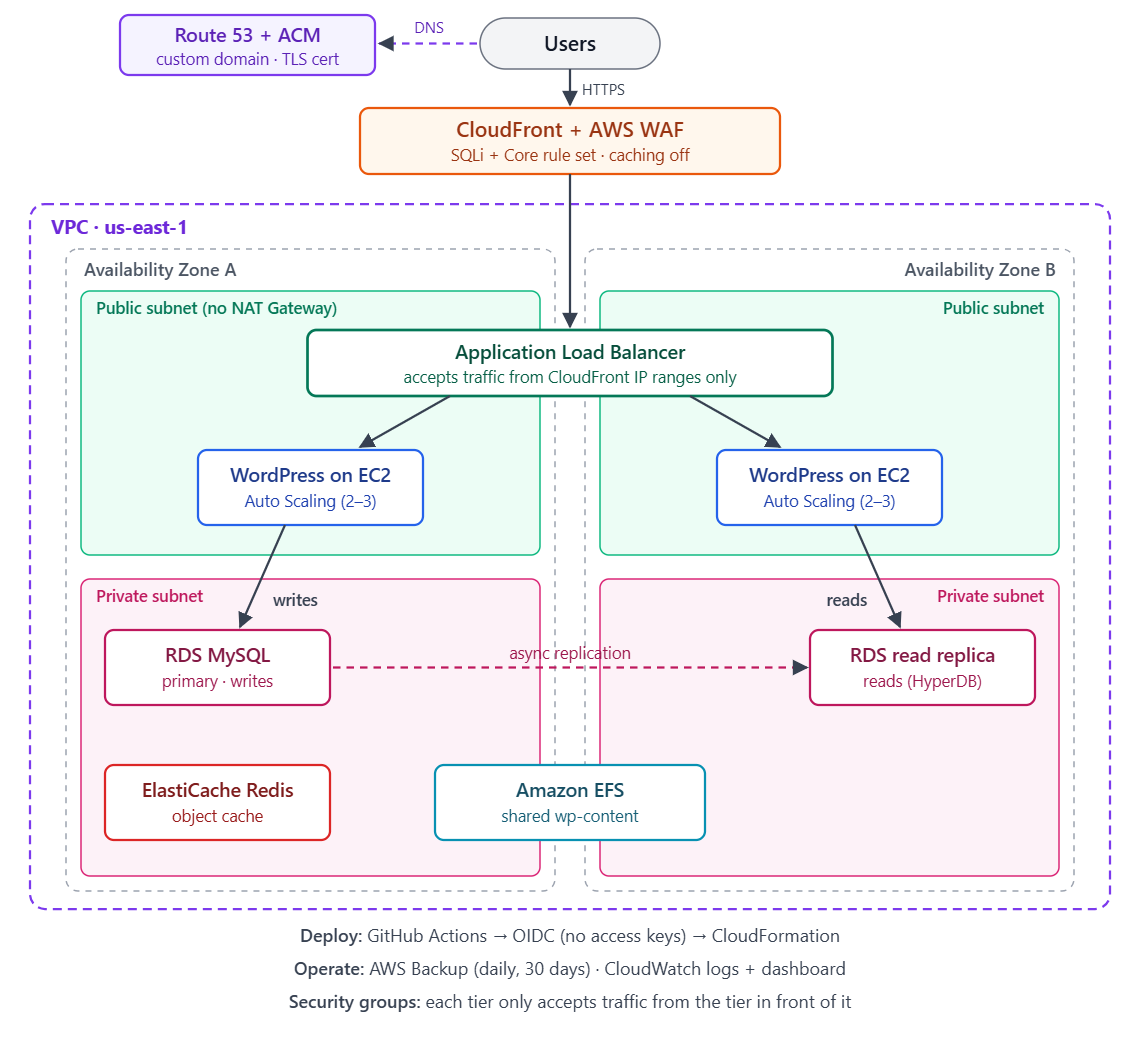
- Edge: CloudFront with my own domain (Route 53 and an ACM certificate), and AWS WAF in front of everything.
- Load balancer: an Application Load Balancer that only accepts traffic from CloudFront.
- Web/app tier: WordPress on EC2 in an Auto Scaling Group, 2 to 3 instances across two Availability Zones.
- Data tier: RDS MySQL in private subnets, with a read replica in the second AZ.
- Supporting services: ElastiCache Redis as an object cache, EFS so all instances share
wp-content, AWS Backup (daily, kept for 30 days), and CloudWatch logs and a dashboard. - Deployment: GitHub Actions runs CloudFormation, using OIDC instead of stored AWS access keys.
It costs around $57 to $61 a month while it’s running, so I scale it down when I’m not using it.
The biggest thing I learned is how these services depend on each other. Most of my problems didn’t come from one service on its own, but from the places where two of them connect: GitHub and IAM, CloudFront and the load balancer, the WAF and the WordPress editor.
Problem 1: GitHub Actions couldn’t log in to AWS
I didn’t want AWS access keys saved in GitHub, so I set up OIDC. GitHub gives each workflow run a short-lived token, and AWS trusts that token through an IAM role.
The workflow kept failing with this:
Not authorized to perform sts:AssumeRoleWithWebIdentity
The role, the OIDC provider and the secrets all looked right. The error doesn’t say which condition failed, and GitHub’s logs don’t show the token.
CloudTrail had the answer. The denied AssumeRoleWithWebIdentity call is logged there, and userIdentity.principalId shows the exact sub claim that GitHub sent. Mine included the numeric IDs of my GitHub account and repo, but my trust policy only had the names, so the condition never matched.
The fix was to add the IDs to the trust policy condition:
token.actions.githubusercontent.com:sub: !Sub repo:${GitHubOrg}@${GitHubOrgId}/${GitHubRepo}@${GitHubRepoId}:ref:refs/heads/${GitHubBranch}
Right after that, the deploy failed again, this time on cloudformation:GetTemplateSummary. The aws cloudformation deploy command needs that permission behind the scenes, and I had left it out of my least-privilege policy.
My takeaway: when IAM says “not authorized”, check CloudTrail before changing anything. It shows what AWS actually received.
Problem 2: My own WAF blocked me
The WAF uses two AWS managed rule groups: the SQL injection rule set and the Core rule set, which includes XSS protection. It worked a little too well.
The first block came when I published my first post. WordPress showed “Updating failed. The response is not a valid JSON response.” The browser’s network tab showed a 403 from CloudFront, which meant the request never reached WordPress.
The rule was SizeRestrictions_BODY. It blocks any request body over 8 KB, and the WordPress editor sends the whole post as JSON every time it saves. Short drafts saved fine, but a real article didn’t.
I changed that rule to Count and raised the WAF’s body inspection limit to 64 KB. The second change is important. Without it, the SQL injection and XSS rules only look at the first 8 KB of a request. To test it, I sent a SQL injection string after 12 KB of padding, and it was still blocked.
The second block came a day later, when editing the site footer failed with a 403. This time it was CrossSiteScripting_BODY. The block editor adds style="..." attributes to its HTML, and the rule treats that as a possible XSS attack. It also blocked a diagram I tried to add to a post.
I didn’t want to turn off XSS checks for the whole site. Instead, I set the rule to Count and added my own rule that blocks the same match everywhere except the WordPress REST API, which the editor uses:
- Name: BlockXSSBodyExceptRestApi
  Priority: 2
  Action:
    Block: {}
  Statement:
    AndStatement:
      Statements:
        - LabelMatchStatement:
            Scope: LABEL
            Key: awswaf:managed:aws:core-rule-set:CrossSiteScripting_Body
        - NotStatement:
            Statement:
              ByteMatchStatement:
                SearchString: /wp-json/wp/v2/
                FieldToMatch:
                  UriPath: {}
                TextTransformations:
                  - Priority: 0
                    Type: NONE
                PositionalConstraint: CONTAINS
Then I tested both sides. The same payload now reaches WordPress on the REST API, which still requires a login, and it’s still blocked on other pages such as /wp-login.php.
My takeaway: managed rules are a starting point. Test them against your real application, and when one gets in the way, make the smallest exception you can instead of switching it off.
A few more things I ran into
A WAF can be bypassed. At first, the load balancer was open to the internet, so anyone could skip CloudFront and the WAF by using the ALB’s DNS name directly. I restricted the ALB’s security group to the AWS managed prefix list for CloudFront. Now a direct request just times out.
The endless /wp-admin redirect. After I added CloudFront, /wp-admin redirected to itself forever. CloudFront talks to the ALB over HTTP, so WordPress saw X-Forwarded-Proto: http and kept trying to “fix” the URL. The header I needed was CloudFront-Forwarded-Proto, and CloudFront only sends it when the origin request policy includes CloudFront headers.
Proving the read replica works. WordPress doesn’t support read replicas on its own, so I used HyperDB to send reads to the replica and writes to the primary. To check it, I compared the MySQL Com_select counter on both databases before and after 15 page loads. The replica went up by 399 and the primary by 1. A direct write to the replica failed with a read-only error, which confirms that writes can only go to the primary.
What I’d do differently
I would make security the priority from day one, starting with encrypting RDS.
I added the read replica before turning on encryption at rest. A replica has to match its source, so now both databases are unencrypted, and fixing it means restoring from an encrypted snapshot to a new database endpoint. If I started again, I would enable encryption at rest and require TLS between WordPress and the database before building anything else.
What’s next
- Encrypt the database: turn on encryption at rest for RDS and enforce TLS connections.
- Move to private subnets: the web servers are in public subnets today to avoid NAT Gateway costs. Their security group only accepts web traffic from the load balancer, but I want them fully private and managed with Session Manager instead of SSH.
- Add caching: caching is off in CloudFront right now, because caching WordPress pages at the edge could show one person’s logged-in page to someone else. The next step is caching static files such as images.
I’ll write about each of these as I do them. If you’re building something similar or have questions about this setup, feel free to reach out on LinkedIn.